Affichage des articles dont le libellé est pc. Afficher tous les articles
 Lenovo makes some of the best laptops in the world, but it also has a few clunkers that hold the brand back. The company's ThinkPads remain the best business laptops in the industry, while its premium Yogas are fantastic, bend-back 2-in-1s. However, in 2015, we reviewed a couple of mediocre budget systems, along with the ambitious but fatally flawed LaVie Z, which weighed a wonderfully light 1.8 pounds but had an awful keyboard.
The company's weak phone support continues to hold the company back, as we experienced incorrect answers to our questions and long wait times. However, innovative applications such as WRITEit, SHAREit and REACHit are a bright spot.

Design (12/15)

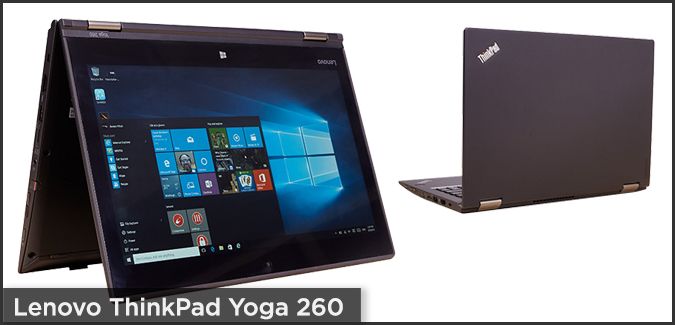
If it's superlight or folds, it's got to be Lenovo. The brand that brought folding, multiuse Yoga laptops to the mainstream, Lenovo now has a Yoga for every use, from the business-minded ThinkPad Yoga 260 to the premium-consumer Yoga 900. The company reworked its Flex line, creating notebooks like the Flex 3 11-inch that significantly blurred the lines between budget and premium.

Though poor battery life and uncomfortable keyboards kept us from recommending them, the LaVie Z 360 and the LaVie Z were design highlights, with a thin and light chassis of record-breaking proportions. Speaking of featherweight, Lenovo delivered the G50-45, one of the slimmest budget laptops on the market, and the X1 Carbon, one of the lightest business laptops. Lenovo's budget laptops (100S Chromebook, IdeaPad 100, S21e-20) could use some work, as the materials and build quality are decidedly no-frills. The company's Y700 Series laptops, with their sturdy black aluminum frames, offer gamers an understated alternative to all the flashing lights and over-the-top effects.

Reviews (18/30)

The biggest change in the review rankings for 2016 belongs to Lenovo, which has fallen to seventh after being tied for third last year. For 2016, Lenovo is tied with Toshiba for having the most systems (five) that earned a 2.5 star rating or less, which hurt its overall score. Led by the 4.5-star ThinkPad Yoga 15, Lenovo's ThinkPad line reviewed markedly better than its IdeaPad series of laptops, and despite being superthin and light, Lenovo's partnership with NEC for theLaVie Z and the LaVie 360 was a dark spot in its lineup that contributed to its underperforming review ranking.

Tech Support (16/20)

With an average call time of 27 minutes, Lenovo's phone support representatives did a poor job handling our questions, no matter if we needed immediate support or asked them to call us back later. We appreciate the company adding online chat and tutorials, but Lenovo needs to nail down other basics, such as storing registration information so we don't need to repeat product information with every call.

Warranty (3/5)

The kind of warranty coverage you get with a Lenovo laptop depends on the make and model. Mainstream consumer models have a one-year limited warranty where the customer pays for shipping. Business laptops and premium consumer models have a one-year "depot warranty" where Lenovo pays for shipping, and some more expensive business models may come with a three-year depot warranty instead. The company doesn't penalize you for upgrading your laptop, and in some cases, it may actually ask you to fix your own device by shipping you the replacement parts.

Software (4/5)

In our reviews, Lenovo's file-transfer apps, SHAREit and REACHit, have been mentioned as some of the most helpful apps installed by a manufacturer. The company is also known for its OneKey recovery tool.
On the IT side of things, Lenovo's Solution Center could be helpful, allowing for hardware scans and analyzing security and performance.
Perhaps best of all, though, is that with the exception of a few computers, bloatware was either minimal or not on Lenovo's machines at all. The ThinkPad X1 Carbon, a machine with bloatware, was plagued only by Evernote and The Weather Channel app. In 2015, Lenovo released the record-setting thin and light LaVie Z laptop, which was a great technical achievement.

Innovation (9/10)

After pioneering the 360-degree, bend-back form factor with its Yoga laptops, Lenovo has been bringing the same hinge design to business and consumer notebooks of different sizes and prices. The company has been particularly innovative on the software front, adding to its suite of helpful apps with WRITEit, a program that lets you scribble handwriting into any text field, and REACHit, which helps you manage all your cloud files with Windows 10's Cortana assistant.
In 2015, the company released the record-setting thin and light LaVie Z laptop, which was a great technical achievement, but not such a great product overall. In 2016, the company will be among the first to offer a laptop with an OLED screen when it ships a special configuration of the ThinkPad X1 Yoga.

Value and Selection (15/15)

Lenovo hits every segment of the laptop market with great aplomb. Its $179 IdeaPad 100S is the best sub-$200 laptop we've tested, while its $1,199 Yoga 900 is the leading premium 2-in-1. The company is particularly famous for its ThinkPad line of business laptops, which range from the small business-centric ThinkPad E series to the mainstream ThinkPad T Series, ultrathin X1 Carbon and P70 graphics workstation. While not as powerful as the best Alienware or MSI gaming rigs, Lenovo's Y700 gaming laptops offer really good performance for the money.
The company offers some great values, including the IdeaPad 500 and IdeaPad 300, both of which provide 1080p displays for under $500. Lenovo.com also lets you custom configure many of the company's laptops, choosing specs like RAM, CPU, storage and screen.

How Lenovo Can Improve

Lenovo shouldn't release a product unless it's ready for prime time; that means avoiding failed experiments like the LaVie Z and the Lavie Z 360. The company also needs to raise the standards for its mainstream and budget systems. Improving the quality of its phone support and paying for return shipping on all of its products would also be welcome changes.


Occupying last place for the second time since 2013, Toshiba seems like a company that's just been going through the motions for the past several years. The last time the brand placed any higher than seventh was in 2011, when it graced fourth place. Toshiba is always at or near the cellar because of its poor-quality laptops, weak support and mediocre design. - See more at: http://www.laptopmag.com/articles/toshiba-brand-rating#sthash.6zhkRxbs.dpuf
 To add insult to injury, the company preloads a lot of bloatware and makes you pay your own return shipping for defective products. Toshiba's lineup has a few bright spots, though, including an excellent Chromebook and a long-lasting 2-in-1.

Design (8/15)

Toshiba doesn't make particularly pretty laptops, but they're not ugly either; they’re just meh. Take the Kirabook 2015, which is sporting the company's Skyline design language that offers a brushed, silver, aluminum frame that's totally inoffensive. Both the Radius 14 and 15 borrow heavily from Lenovo's 360-degree hinge design, but neither really brings the wow factor of its competitor.
- See more at: http://www.laptopmag.com/articles/toshiba-brand-rating#sthash.6zhkRxbs.dpuf
 The Portege z30t, with its spill-resistant keyboard and drop-tested chassis, is a standout in the lineup. But you also have the Satellite C55DT, which looks premium despite its plastic shell but suffers from a sharp, upward-pointing edge that presses uncomfortably into your wrists. Ultimately, Toshiba laptops are solid products, but based on design alone, they tend to fade into the background.

Reviews (13/30)

With a score of 13 out of 30, Toshiba once again finished with the worst average rating in the past year. The company had five systems that earned scores of 2.5 or less. The only real bright spots for the company were its Portege Z20t, a premium 2-in-1 with over 14 hours of endurance, and its updated Chromebook 2, which improved upon the original with a brighter display and more-recent components. But as whole, the results weren't pretty.

Tech Support (16/20)

In a word, Toshiba's technical support is difficult. The company's online resources were too Windows 8-specific during our tests, and its bot-based Virtual Help Desk led us in a loop of queries with no answers in sight. We fared better on some of our phone calls with Toshiba reps, but one agent almost had us reset a notebook's BIOS when all we needed to do was uncheck a box in a preference window.

Warranty (2/5)

Toshiba makes you pay for your own shipping if you have to send a laptop in for repair. The company provides a vanilla one-year warranty, but unlike some competitors, Toshiba lets you upgrade your system without losing coverage.

Software (2/5)

The company preloads some useful first-party utilities, but far too much unwanted software. The Portege Z30t, Satellite Radius 15 P55W and Kirabook include My Toshiba, which lists featured partners, and an eco utility for more-prudent energy usage. The Portege adds in several security applications, including a password manager and a fingerprint utility.
- See more at: http://www.laptopmag.com/articles/toshiba-brand-rating#sthash.6zhkRxbs.dpuf
Unfortunately, Toshiba piles on the most bloatware in the business, ranging from links to advertisers in the task bar to games and apps we didn't want or need. Culprits include Netflix, eBay, WinZip, Flipboard and Spotify, though that's just a small taste of what Toshiba's computers have come riddled with in the past year.

Innovation (5/10)

Toshiba hasn't broken a lot of new ground in the past year. The company continues to offer a number of 2-in-1s with 4K displays and styluses, but hasn't done much to stand out from the crowd, other than providing some low prices. Sometime in 2016, consumers can look forward to seeing the dynaPad, a lightweight, 12-inch Windows tablet that can serve as a laptop when you attach its optional keyboard.

Value and Selection (12/15)

Toshiba offers a wide swath of laptops, from the $270 Toshiba Chromebook 2 to the pricey, $1,700 Kirabook (2015). The company has budget laptops and 2-in-1s of all sizes well-covered, while its Tecra line provides plenty of options for businesses of all sizes. However, you won't find a serious Toshiba gaming laptop or graphics workstation with professional-grade Nvidia Quadro graphics. The company has a lot of low-cost laptops, but we couldn't find one with a 1080p display for under $750.

How Toshiba Can Improve

There's nowhere for Toshiba to go but up. The company needs to dramatically improve its laptop designs and build quality, while offering more fresh ideas. Toshiba should also dump the crapware from its systems.

Les plus Design bord à bord pour l'écran et le clavier, très haute définition de l'écran, processeur Intel de dernière génération. encombrement : un 13" pouces dans un corps de 11".
Les moins Tarif des modèles très haut de gamme, autonomie en déça de certains concurrents.
Sommaire Le Dell XPS 13 de 2015 inaugurait un nouveau design, plus tranchant avec un magnifique écran bord à bord. Le Dell XPS 13 2016 le reprend et le dote des toutes dernières puces de chez Intel. La machine de Dell reste une référence dans le monde des 13".
Choisir le PC portable parfait peut être aussi compliqué que couteux. Le MacBook Air 13 pouces fait toujours partie de nos modèles favoris, mais il faut dire que son design commence à vieillir et qu'il n'est plus vraiment au goût du jour en termes de spécifications et de certaines fonctions. Le Yoga 900 de Lenovo est un hybride à la fois puissant et fin mais qui se paie au prix fort. Le nouveau Blade Stealth de Razer combine richesse fonctionnelle et prix correct, mais il s'adresse d'abord aux amateurs de jeux 

Chez Dell, l'XPS 13 sorti en 2015 est passé tout près de la formule parfaite, avec son écran presque sans bordure et un tarif de départ inférieur à 1000 dollars aux États-Unis. En France, le prix d'attaque pour ce modèle se place à 1299 euros. Cette cuvée 2015 ne proposait pas d'écran tactile, ce qui est tout de même une fonction indispensable pour un portable Windows haut de gamme. Malgré cela, ce modèle s'est imposé comme l'un de nos favoris dans la gamme des portables 13 pouces et son grand frère de 15 pouces nous a tout autant impressionné.
Pour l'édition 2016 de l'XPS 13, Dell a choisi de monter en gamme. On passe sur un processeur Core i7 avec 8 Go de mémoire vive, 256 Go de SSD et un écran tactile qui affiche 3200 x 1800 pixels avec une bordure toujours aussi minimaliste. La partie graphique évolue également avec une puce Iris signée Intel qui n'est certes pas aussi performante qu'une carte graphique dédiée de chez Nvidia ou AMD mais qui est tout même nettement supérieure à ce que proposent les autres PC portables dans ce domaine.
En France, le modèle de base avec Core i7  coute 1599 euros. La note est salée, mais cet XPS offre un superbe design, un excellent clavier et un écran presque sans bordures avec lequel personne n'est encore venu rivaliser. On est toujours sur une ligne aux angles prononcés loin des arrondis qui ont longtemps prédominé.  Le clavier et le pavé tactile  sont spacieux. La connectique suffisante pour satisfaire la plupart des utilisateurs. La nouveauté dans ce domaine concerne l'arrivée d'un portThunderbolt 3 au format USB-C qui sert au transfert des données et des vidéos mais pas pour l'alimentation.
Les dimensions sont toujours aussi compactes, en grande partie du fait de l'absence de bordures autour de l'écran. Résultat, l'XPS 13 a des dimensions inférieures à celles du MacBook Air, du Yoga 900 ou du Surface Book toujours en affichant presque le même poids sur la balance : 1,27 kg. Du coup, on a l'impression que le portable est un peu lourd lorsqu'on l'a en main.
Le clavier du Dell XPS 13 est largement supérieur à ceux des autres portables ultra fins. La profondeur, les dimensions (en particulier les touches importantes Maj, Tabulation...) et la dureté des touches sont excellentes et le rétroéclairage très efficace. Le pavé tactile est de bonne dimension, mais, comme sur les précédentes génération, il y a un côté un peu flottant qui nous gêne. Par exemple, lorsque l'on utilise trop fréquemment le défilement à deux doigts, il arrive que cela active accidentellement la fonction pincer pour agrandir.
L'écran qui est tout simplement excellent compense largement tous les petits défauts. La définition de 3200 x 1800 pixels est assez proche de l'Ultra HD pour satisfaire la plupart des besoins d'affichage haute définition. L'aspect tactile s'avère aussi très performante et la visibilité reste bonne sous tous les angles. même sur des angles décalés.

Performances

La plupart des portables équivalents que nous avons testé sont équipés d'un processeur Intel i7-6200U ou 6500U (le U indique qu'il s'agit d'une puce basse puissance qui consomme moins d'énergie spécialement conçue pour les machines portables). Le Dell est doté d'un Core i7-6560U, ce qui lui a permis de battre le Blade Stealth, le MacBook Air et les autres modèles lors de nos tests de performances.
La puce graphique Iris est à la hauteur pour des vidéos en haute définition et quelques jeux basiques, mais cela n'en fait pas un PC portable pour les joueurs invétérés.
L'autonomie de la batterie est meilleure que prévu mais elle n'est pas exceptionnelle. L'XPS 13 version 2016 a tenu 6h12mn à notre test de lecture vidéo en streaming. Acceptable, mais pas impressionnant. En comparaison, le Yoga Y900 a tenu deux heures de plus et le MackBook Air presque deux fois plus longtemps. Un écran très haute définition a évidemment une incidence sur l'autonomie. Si vous avez besoin d'une machine qui tienne toute une journée, partez plutôt sur un modèle affichant 1920 x 1080 pixels

La gamme des XPS 13 demeure l'une de nos références dans la famille des PC portables 13 pouces grâce à son superbe écran, un design spécifique réussi, une fiche technique de haut vol et une belle palette de fonctionnalités. Ce modèle 2016 apporte plusieurs améliorations dont une très belle mise à jour technique : Intel Core i7 et puce Iris de dernière génération . Son prix plus élevé le place dans une position moins favorable sachant qu'il existe beaucoup de très bons PC portables dans cette catégorie pour 1200 - 1300 euros.